E-SIGNATURE

Timesheet sign-off, built into every pay period

E-signature software for timesheets: request and track sign-offs when you close payroll. Included on every plan, never sold as a separate module.

HOW IT WORKS

Sign-off without the paperwork

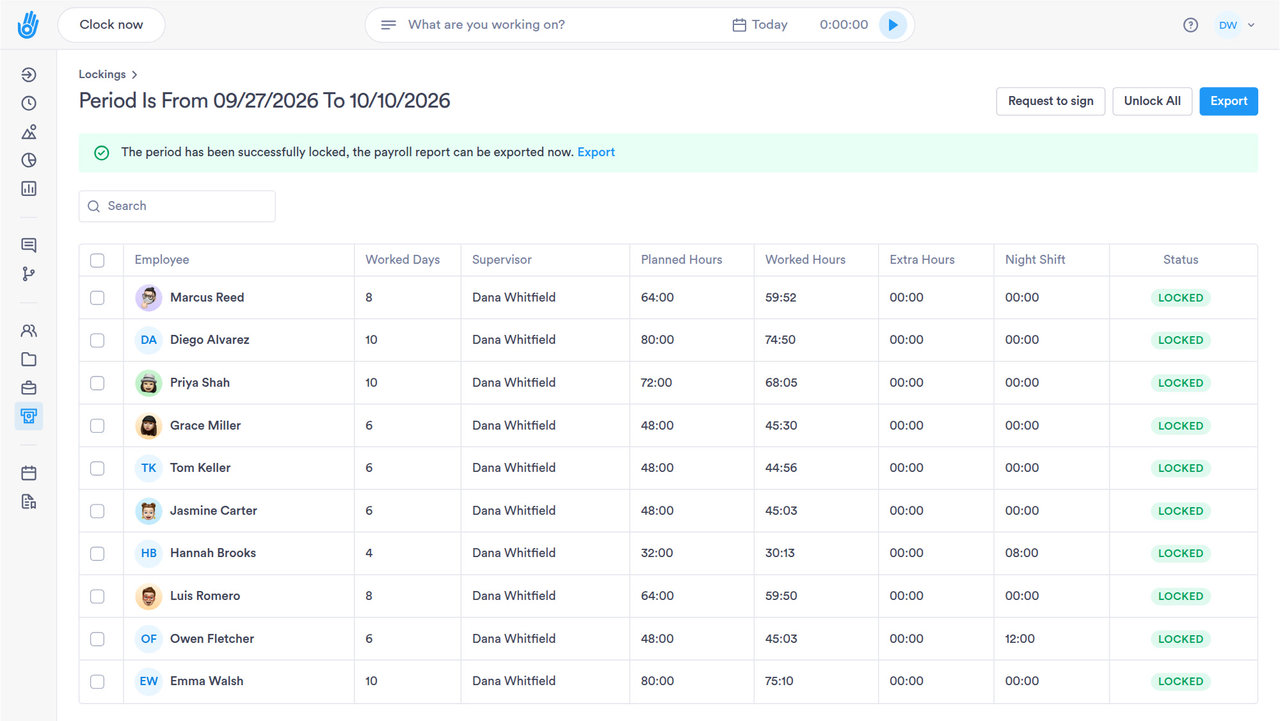
Employees and managers sign timesheets directly in the app, creating a signed record the moment payroll closes.

01

One-Click Signing

Employees sign from their phone or tablet in seconds, no printing required.

  • ✓ Works from a phone, tablet, or desktop browser
  • ✓ No document to print, scan, or mail back
  • ✓ Request goes out the moment payroll closes
  • ✓ Employee acknowledgment logged with the signature

02

Requests That Send Themselves

Send a document automatically when something happens, like a new pay-policy assignment.

  • ✓ Triggered by an event or on a schedule
  • ✓ Automatic reminders chase down missing signatures
  • ✓ Pending requests visible in one dashboard
  • ✓ Cancel or reissue a request before it's signed
03

Signed Records on File

Every signed timesheet is kept on record for a clean history.

  • ✓ Every request stays in the sent-documents log
  • ✓ Original signed document preserved as filed
  • ✓ Signed documents stored under your retention policy
  • ✓ Full history retrievable from the employee's record
04

Documentation that stands up to scrutiny

E-signed timesheets give you a complete record of who approved which hours. If an employee or the Department of Labor ever asks, it's ready.

  • ✓ Included standard, not an add-on
  • ✓ Full audit trail on every signature
  • ✓ Faster payroll close, fewer disputes
DIG DEEPER

More on sign-off

The parts of sign-off that don't fit in three panels, but matter every pay period.

DOCUMENT ACCESS AND CONTROL

Not everyone can send or cancel a request

Role-based permissions decide who manages templates, who can cancel a pending request, and who only views.

01

A managed template library, not a blank document

Signature requests are built from a library of approved templates, not drafted fresh each time.

02

Canceling is its own permission

Reissuing or canceling an unsigned request is separate from the permission to send one.

03

View access without edit rights

Some roles can see a signature's status without being able to manage the template behind it.

04

Acknowledgment and signature, tracked apart

A document can call for a plain acknowledgment or a full signature, and the record shows which applied.

PAYROLL AND HR SYSTEMS

Sign-off that reaches payroll without extra steps

Signed timesheets export straight into ADP, SAP or Workday. No re-keying hours by hand.

SAP SuccessFactorsADPWorkdayOraclePapaya Global
See all integrations
BEYOND TIMESHEET SIGN-OFF

Documents don't stop at the timesheet

The same e-signature engine handles company documents outside of payroll.

Any document, not just timesheets

Send offer letters, policy acknowledgments, or compliance forms through the same signature flow.

A sent-documents log for every request

See what went out and who still needs to sign.

Automation triggers a document on its own

A new hire added or a policy updated can send the right document without a manager starting it.

Target a specific segment, not everyone

Send a document to one location, department, or role instead of the whole company at once.

Bulk send to a whole team

Push the same document to everyone at once instead of one at a time.

A dedicated signature report

Pull every request sent, signed, or still pending as its own report, filterable by date or employee.

QUESTIONS

Timesheet e-signature: common questions

Which Day.io plans include e-signature for timesheets?

E-signature for timesheets is included on every Day.io plan, including the free plan for up to 10 employees. You don't pay for a separate e-signature tool to get timesheets signed.

Can employees sign their timesheets on their phone?

Yes. Employees sign their Day.io timesheets electronically from their phone or a computer. Nobody has to print a time card, sign it by hand and scan it back.

What does a signed timesheet in Day.io let me show?

A signed timesheet in Day.io records that the employee signed off on those hours. If an employee or the Department of Labor ever asks about hours, you can pull up which timesheets each person signed.

How long does Day.io keep signed timesheets?

Day.io keeps signed timesheets and other time records for as long as your company requires, and the product does not delete them on its own. A signed timesheet stays on file after the employee leaves.

Get timesheets signed without the paper

Start free for up to 10 employees and send your first sign-off request. Questions first? Talk to a specialist.