



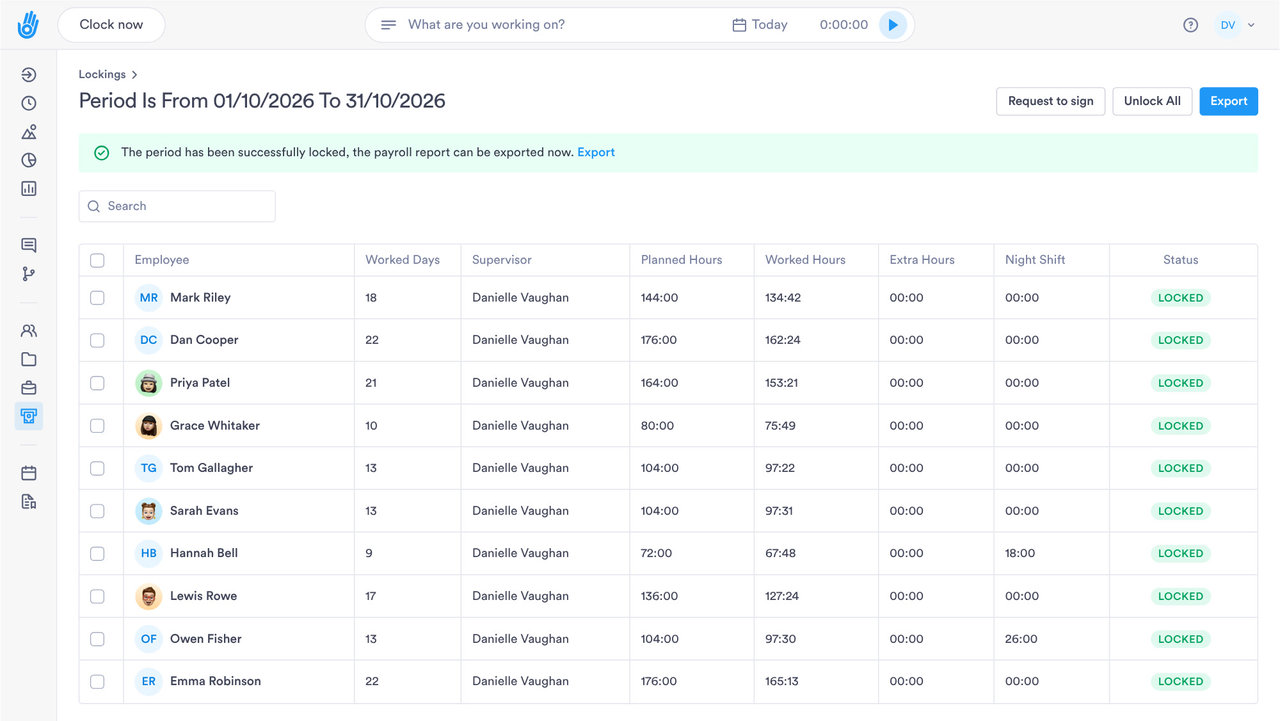
TIMESHEET E-SIGNATURE

Get timesheets signed when the pay period closes

Request and track employee e-signatures when you close timesheets, from a phone or a computer.

SECURE SIGN-OFF

From clock-in to signature, in one system

Replace paper sign-off with signed timesheets kept in the same account as your hours.

01

Bulk requests

Send signature requests to your entire team in a few clicks.

  • ✓ Sign from a phone or a computer
  • ✓ Signed on screen and kept on file
  • ✓ Requests go out when payroll closes
  • ✓ The signature saved on the employee's record

02

Live tracking

See who's signed at a glance, with automatic reminders chasing anyone outstanding.

  • ✓ Sent to each person when the pay period closes
  • ✓ Automatic reminders for missing signatures
  • ✓ Every pending request in one place
  • ✓ Automatic reminders, or cancel before it's signed
03

Phone or computer

Employees sign their timesheet from a phone or a computer, and the signed copy is kept on file.

  • ✓ Each request kept in the sent log
  • ✓ The signed copy kept as it was signed
  • ✓ Signed documents kept under your retention policy
  • ✓ The full history on the employee's record
04

Signed timesheets you can show if anyone asks

Each signed timesheet is kept on file under your own retention policy, so you can find it when someone asks.

  • ✓ Every signed timesheet on the employee's record
  • ✓ Automatic reminders for outstanding signatures
  • ✓ Secure, centralised storage for every signed document
DIG DEEPER

Everything else E-Signature does

What happens between a signature request and a fully closed pay period.

WHO CAN DO WHAT

Choose who can send or cancel a request

Roles decide who manages templates, who can cancel a request and who can only view.

01

Templates you set up once

Signature requests start from your saved templates, so nobody drafts one from scratch.

02

Cancelling is its own permission

Cancelling an unsigned request can be given to some roles only.

03

View without editing

Some roles can see who has signed without being able to change the template.

04

Acknowledge or sign

A document can ask staff to acknowledge it or to sign it, and the record shows which.

PAYROLL AND HR SYSTEMS

Signed hours, ready for payroll

Hours from signed timesheets export as Excel or CSV for whoever does your payroll.

SAP SuccessFactorsADPWorkdayOraclePapaya Global
See all integrations
OTHER DOCUMENTS

Use it for more than timesheets

Send other company documents for signature in the same way.

Policies and letters too

Send a policy or a letter for staff to sign, the same way as a timesheet.

A log of every request

See what went out and who still needs to sign.

Sent automatically

Assigning someone a pay policy, or a date you pick, can send a document on its own.

Send to one site or team

Choose who gets each document: one person or a group of staff.

Send to a whole team at once

Send the same document to everyone in a team in one go.

A signature report

A report lists every request you sent and whether it has been signed.

QUESTIONS

Timesheet e-signature: common questions

Do I need a separate e-signature tool?

No. Timesheet sign-off is part of Day.io, so the hours and the signatures sit in the same account.

Can staff sign their timesheets on their phone?

Yes. Staff sign from their phone or a computer. Nobody prints a timesheet to sign by hand and scan back.

What does a signed timesheet let me show?

It shows the employee signed off those hours. If HMRC or the Fair Work Agency ever asks, you can pull up which timesheets each person signed.

How long are signed timesheets kept?

As long as your company needs. Day.io doesn't delete them, and they stay on file after someone leaves.

See how timesheet sign-off works in Day.io

Talk to a specialist and see how to digitise your timesheet close.