





ORG CHART SOFTWARE

Your org chart, without the slide nobody updates

Day.io draws your org chart from the employee records you already keep. Find anyone in seconds, filter by department or location, and decide who sees the whole company or only their own team.

HOW IT WORKS

One chart, built from the people already in Day.io

No boxes to drag. Set each person's manager once and the chart follows. Included on every plan.

01

Built from your People records

Each person's manager, department and location come from their profile, so the chart changes when the profile does.

  • ✓ Drawn from the manager on each profile
  • ✓ New people appear as soon as they're added
  • ✓ People with no manager are counted, not lost
  • ✓ Nothing new to type in
02

Find anyone, see any team

Search a name and the chart opens their reporting line, centers their card and shows their details.

  • ✓ Expand a team in place, with direct and total reports
  • ✓ Filter by department and location
  • ✓ Cards colored by department
  • ✓ Download the current view as an image
03

Each role sees what it should

Choose who sees the full company and who sees only their own tree.

  • ✓ Full company, or only their own tree
  • ✓ A manager sees everyone below them and the line up to the top
  • ✓ Their peers' teams stay out of view
  • ✓ Read-only: nobody edits from the chart
04

One record per employee, behind the chart and everything else

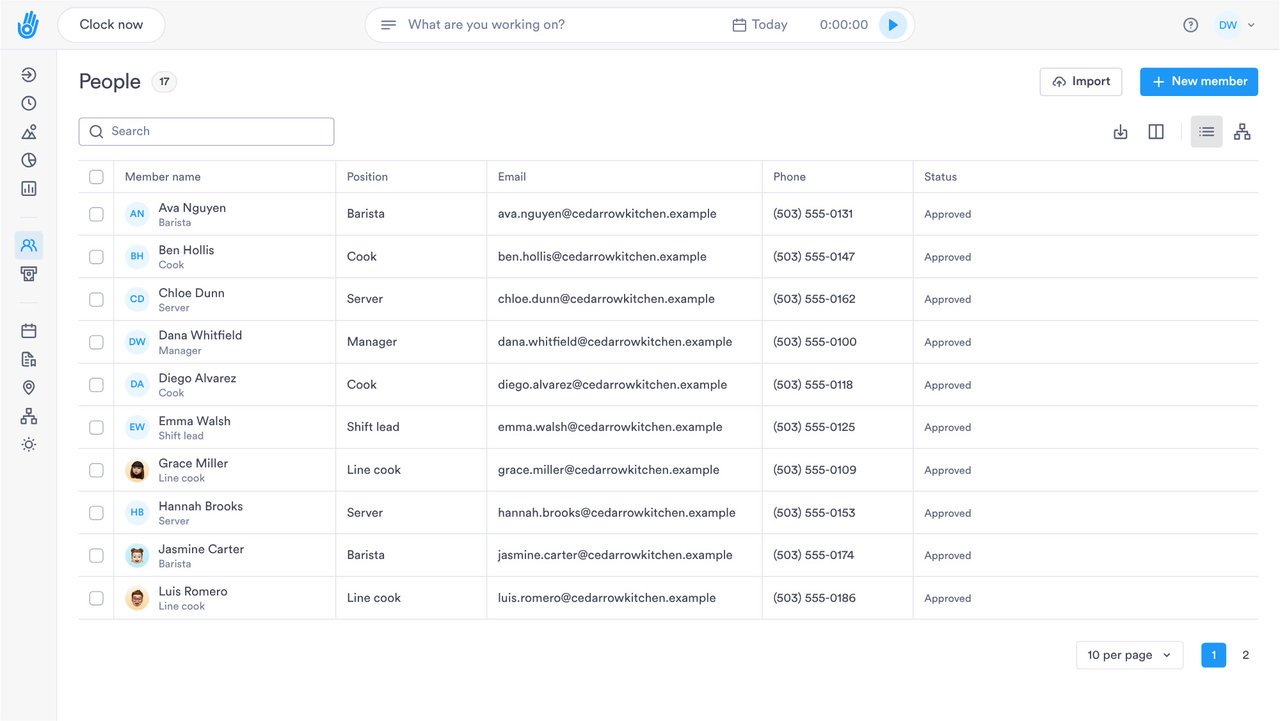
People is where you keep each employee: who they report to, their department, position, location and team. Schedules, pay policies, time off and payroll all work from the same record, so the chart is never a separate list to keep up.

  • ✓ Add people one by one, several at once, or from a spreadsheet
  • ✓ Or bring them in from the HR or payroll system you already run
  • ✓ Assign schedules, locations or teams to many people at once
DIG DEEPER

Getting around a bigger chart

The tools that help once the company is too big to see on one screen.

WHO SEES WHAT

Decide who sees the whole company

Seeing the org chart is its own permission, separate from what someone can change in People.

01

Turned on per permission role

Roles without the org chart permission don't see it, and People works for them as it always has.

02

A manager sees their own tree

Everyone below them and the managers above them, up to the top. Not their peers' teams.

03

Images and links keep the same limits

A downloaded image or a copied link only ever shows the people that person is allowed to see.

04

Only what's already visible

The chart shows name, photo, position, department and location. No phone, email or pay.

HR AND PAYROLL SYSTEMS

People that stay in sync

Bring employees in from the HR or payroll system you already run.

SAP SuccessFactorsADPWorkdayOraclePapaya Global
See all integrations
PEOPLE, IN PRACTICE

The details that keep your records right

Small things that save time every time someone joins, moves or leaves.

Import from a spreadsheet

Upload a file, match its columns, fix the rows Day.io flags and submit. Supervisors in the file become reporting lines on the chart.

Update many people from one file

Change existing records in bulk by employee ID, not one profile at a time.

Changes for many people in one action

Select people in the list to assign a schedule, location, team or group in one go.

A Team tab for every manager

A manager's profile lists the people they manage.

Leaving and coming back

Deactivate someone today or on a future date, and reactivate them if they return.

Download the list

Export the People list with the columns you picked.

QUESTIONS

Org chart: common questions

What is org chart software?

Org chart software shows who reports to whom in your company as a chart you can search and filter. In Day.io it's built from the employee records you already keep, so there's nothing to draw.

How does Day.io build the org chart?

From the manager set on each person's profile in People, whether you added them by hand or from a spreadsheet. People with no manager aren't drawn. The chart tells you how many there are so you can set one.

Who can see the org chart?

You choose which permission roles can see it, and whether someone sees the full company or only their own tree: everyone below them and their managers up to the top. Everyone else sees People exactly as before.

Can I filter the org chart by department or location?

Yes. Pick one or more departments or locations and the chart shows who matches. A list beside it groups the matches by department, and clicking a name takes you to their card.

Can I export or share the org chart?

Yes. Download the current view as an image for a presentation or for onboarding, or copy a link to the same view for anyone who has access to the chart.

Is the org chart included on every plan?

Yes. The org chart comes with every Day.io plan that includes People. There's nothing extra to buy.

See your company's org chart in Day.io

Add your people, set their managers, and the chart is ready. Questions first? Talk to a specialist.